Belgium - NL


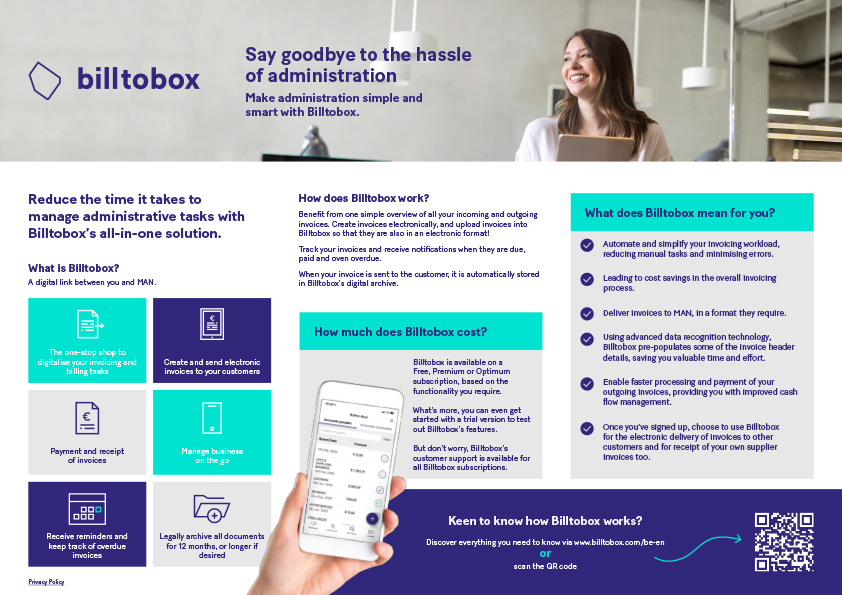
Simplify your administration with Billtobox: the all-in-one solution for invoicing and document management. With our practical guides, you can start quickly and effortlessly.

Welcome to Billtobox, Unifiedpost's digital billing platform. Together with MAN, we invite you to use our user-friendly platform. On this page you will find many resources to optimize and simplify your digital invoicing process. Whether you are a beginner or experienced user, you will find everything you need to get started.
Our guides, FAQs, and useful links will assist you at every stage. We recognize the importance of a smooth transition to digital invoicing and are here to support you with our expertise.
Your convenience comes first. You'll also find contact information for our Billtobox team and MAN if you have specific questions. We look forward to showing you how easy digital invoicing is with Billtobox , and to working with you to create a more efficient and sustainable way of doing business.
Explore our platform thanks to our handy guides, from onboarding to sending your first invoice to MAN.

Our onboarding guide takes you through the process of getting started with your Billtobox, step by step. Discover helpful tips and tricks to get started quickly and get the most out of this efficient solution.


Find what other customers have asked about Billtobox here.
Can't find what you're looking for here or do you have general questions about features?
We recommend visiting our help pages.
Depending on the features you need, Billtobox is Billtobox as a Premium or Optimum subscription. Check out the different packages we offer on our website.
Plus, you can start with a 30-day trial to try out Billtobox 's many features before deciding which subscription best suits your needs.
When you create an invoice for a purchase for which you have received a purchase order (PO) from MAN, you must ensure that the invoice fully matches the PO.
In this case:
A Premium or Optimum subscription allows a total of up to 3 users to access your business.
If you want to give another user access to your company's Billtobox, you can invite them to create their own access.
Here's how you do it:
Learn more about the different user roles on our help pages here: What tasks belong to each role?
If there’s a difference between the data in the original PDF from your ERP system and the document you created in Billtobox to send to MAN (for example, typing errors), the document from your ERP system will be considered the original invoice.
For more frequently asked questions, you can download the full FAQ documentation in our Resources section. Click here to access all answers and more detailed information.
If you need help using Billtobox, such as questions about preparing or submitting invoices, you can go directly to our comprehensive help pages. There you will quickly find answers to the most frequently asked questions and detailed explanations of all functionalities.
Can't find what you're looking for on our help pages? Then feel free to contact our customer support team via the contact form on our website or via our dedicated email address support@billtobox.com.
Does your question relate specifically to your interaction with MAN, such as a purchase order, invoice processing status or payment? If so, please use the MAN Accounting contact form on MAN's supplier portal.
Please refer to the additional information file for Billtobox published on MAN's supplier portal: BANQUP Info_EN.pdf(man.eu).
Please refer to the additional information file for Billtobox published on MAN's supplier portal: BANQUP Info_EN.pdf (man.eu).
Yes, you can choose to use Billtobox to send documents to other customers as well as receive documents from your suppliers digitally. Take advantage of our easy functionality to invite business partners - just click the button at the top right of the platform and choose your preferred invitation method for both customers and suppliers.
Yes, you can still use Billtobox to send your invoices to MAN, but in that case you must make sure you include the cost center on the invoice where applicable. Simply leave the PO number field in the invoice header blank.
A VAT number is not required for the Billtobox-onboarding process. However, to ensure your invoice is sent through the right processing system, we require either your VAT number or your IBAN. Therefore, at least one of these two details must be entered.

If you need help using Billtobox, you can visit our comprehensive help pages.
Can't find what you're looking for on our help pages? Then feel free to contact our team via the contact form on our website or via our email address billtobox
Does your question relate specifically to your interaction with MAN, such as a purchase order, invoice processing status or payment? If so, please use the MAN Accounting contact form on MAN's supplier portal.
Billtobox, the solution for passionate entrepreneurs.
Companies active daily on Billtobox.
Documents processed per month.
Countries where Billtobox is leading and active.


Important update for new customers:
As of June 2026, we look forward to welcoming new customers to our new, improved platform, Banqup. From that moment on, it will no longer be possible to create a new account on Billtobox.


The latest news, articles and resources weekly in your inbox.